Introducing “Clean Unused Shortcodes” for WordPress
Shortcodes are powerful, but over time they can become a problem. Plugins get uninstalled, content changes, and you’re left with broken or unused shortcodes scattered across posts and pages. These not only clutter your content but also create a poor user experience.
That’s why I built the Clean Unused Shortcodes plugin.
Why I Built It
As a developer, I’ve seen too many websites with leftover shortcodes that no longer work. They break layouts, confuse visitors, and are tedious to track down manually. Existing solutions were either too complex or didn’t give enough control. I wanted something simple, visual, and effective.
Key Features
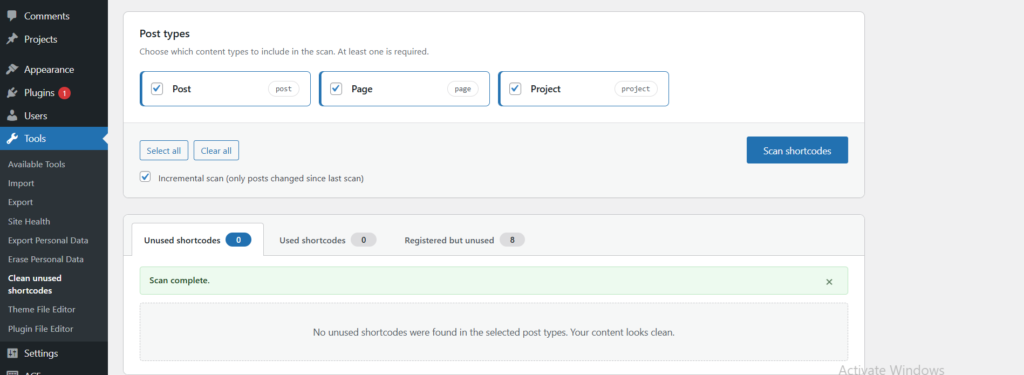
- Preview both unused and used shortcodes before taking action.
- See exactly where a shortcode is located in your posts, pages, or custom post types.
- Edit or view the post directly from the plugin dashboard.Clean individual shortcodes or remove all unused shortcodes with a single click.
- Modern interface powered by React for speed and clarity.
- Dry-run preview — see before/after snippets per post before saving.
- Gutenberg-aware — removes empty
wp:shortcodeblocks after the inner shortcode is stripped.
What Users Are Saying
Don’t just take my word for it—here’s what users are saying on WordPress.org:
- “This plugin worked quickly to remove all remaining Divi shortcodes. Highly recommend it!” — transit54
- “After migrating a 200-page site, I had plenty of leftover shortcodes. This plugin cleaned my contents in seconds. Saves a lot of time and effort.” — yumigo
- “Simple plugin that worked quickly and did exactly what we needed. Will use again!” — gordonium
- “Installed, activated, ran the plugin, and voila. No more shortcode residue from Divi. Thank you!” — Ally Drez
- “With a single click, it cleans the entire shortcode. Perfect.” — freelancesgroup
The feedback confirms the plugin solves a real pain point: broken shortcodes after migrations or plugin removals.
Benefits
- Keep your content clean and professional.
- Improve user experience by removing confusing broken codes.
- Save time with automated detection instead of manual search.
- Take control over your content without touching the database.
What’s Next
I’m working on expanding this plugin with more automation and reporting tools. My goal is to make shortcode management effortless, even on large sites with thousands of posts.
You can install the plugin directly from the WordPress plugin repository and start cleaning up your site today.
Press enter or click